

Recenzje klientów dla Kamera endoskopowa VEVOR z Wi-Fi, kamera inspekcyjna 20 m z 12 diodami LED, oświetlenie 3-stopniowe, kamera do rur IP68 z baterią 4500 mAh i oznaczeniem licznika, kamera kanalizacyjna HD 1080p z obiektywem 120° do inspekcji kanalizacji
20m
Opinie klientów
Jak działają recenzje i oceny klientów
Opinie klientów, w tym oceny produktów w formie gwiazdek, pomagają klientom dowiedzieć się więcej o produkcie i podjąć decyzję, czy jest on dla nich odpowiedni.
Nasza ogólna ocena nie jest zwykłą średnią. Priorytetem są dla nas autentyczne, wiarygodne recenzje i odfiltrowujemy duplikaty lub nieaktualne treści przed obliczeniem ostatecznej oceny. Dzięki temu mamy pewność, że ocena rzeczywiście odzwierciedla rzeczywiste doświadczenia klientów.
Oceń ten produkt
Podziel się swoimi przemyśleniami z innymi klientami
Napisz recenzję
22 Recenzje
Recenzje Bieżącego Produktu
Zweryfikowany zakup
Tylko zdjęcia i filmy
Przetłumacz wszystkie recenzje na Polski
 john
john Worked well
30m
Unit works well. The camera app works OK
2 osób uznało to za pomocne
Przetłumacz recenzję na Polski
Phil73 Workplace usage
30m


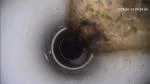
All I can say right now after my first use this morning, installing the app at first is in Chinese, but i had the option to translate to English which went well afterwards that's why i gave it a 4 star for ease of use. Once app is installed and transferred to the wifi of the camera, it was very easy to use in taking pictures and videos. downloading was a charm too, plug in to pc and transfer like any other transfers.
5 osób uznało to za pomocne
Przetłumacz recenzję na Polski
..*** Doute de fiabilité informatique
30m

Apparemment bien conçu sur un certain nombre de caractéristiques, mais je n'ai pas testé l'appareil pour visiter le forage dans mon jardin.
Vevor m'a transmis la notice en français après l'avoir demandée, ce que j'ai apprécié.
Quand j'ai voulu télécharger l'appli "CamerPhone" sur mon téléphone, j'ai eu un avis négatif d'un logiciel non vérifié et probablement espion.
Je préfère ne pas prendre des risques.
0 osób uznało to za pomocne
Przetłumacz recenzję na Polski
 Hans-Jürgen
 Handbuch unbrauchbar bzw. QR code zeigt hier in Deutschland zumindest nicht den richtigen Weg, hatte schon ein anderer Nutzer geschrieben: stimmt
30m
Gerät nicht zu gebrauchen nach 4 Stunden immer noch keine Bilder über WiFi App funktioniert nicht , gekaufte KI konnte es dann lösen. Kundendienst ist dafür schlecht. Besser mit Kamera kaufen.
1 osób uznało to za pomocne
Przetłumacz recenzję na Polski
EMBE Vevor
20m
Première mise en service, premier constat la documentation n'est pas en français alors que sur internet le manuel est traduit dans beaucoup de langues
Connexion pas évidente mais faisable, la qualité d'images n'est pas au top, un autofocus manquant ou peu efficace
Le produit est de bonne qualité générale, manque d'info pour certains ustensiles, des bouchons et un câble dont on ne sait quoi faire
0 osób uznało to za pomocne
Przetłumacz recenzję na Polski
iNspect Sewer WiFi upgraded? to what?
30m
This sewer scope was supposed to have had a counter in it, nothing that measures the length of the sewer cable going in. Not good and then I lose connection in the sewer where it freezes, so this is a inferior product. I can't use this at all, no measurement in it. I need to return for a full refund and send this back.
0 osób uznało to za pomocne
Przetłumacz recenzję na Polski
Bu*** Impossible to set up
50m
I have a minor in computer Science from Texas Tech University. I can not get help how to connect my camera to my laptop. The software I was instructed to download sent my computer into a death spiral with a blue screen demanding all of my personal information and a credit card number. the blue screen was on all account on the computer including the ADMIN account. I had not option except to reboot my computer in safe mode and reset it to previous state, after I conducted a deep scan and checked the registry for recent changes. I have still not gotten the signal from the Pipe View unit where it can be displayed on a laptop or iPad. No help from Vevor no help online from users who claim they got it setup
2 osób uznało to za pomocne
Przetłumacz recenzję na Polski
Daniel Sewer camera scope wireless wifi
50m
The camera app you need to download tells you it's harmful and will take personal information not safe to download. And I got a email from vevor and it said the something.
4 osób uznało to za pomocne
Przetłumacz recenzję na Polski
Hans Mr
30m
App not working on either iPhone or Android. Contacted support and they dont solve the problem so i dont know if the product works or not.
4 osób uznało to za pomocne
Przetłumacz recenzję na Polski
theohughes74@gmail.com Once you get past the setup it's pretty good
30m
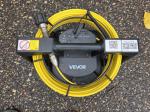
I made a mistake and ordered 2 of these without reading the description closely and not realizing they don't have a screen so when I got them rather than going thru the hassle of returning I gave it a shot.
I would give it 5 stars for the price but initial setup was a hassle, a normal person might run in to trouble and get frustrated.
This was on an Android:
Scanned the code on the machine and found where to download the .apk, got a warning of unknown file, selected download anyway, went to my download folder with File Manager, clicked on the file, selected "Allow File Manager to install this type of file" and gave permission, got a warning about installing unknown .apk, selected install anyway, opened the file, it's in Chinese, tapped randomly on things until I saw the word English and tapped that switching it to English, closed the app. Turned on the machine, opened WiFi on my phone and found WiFi_C032EE, entered 12345678 as the password and selected "auto reconnect". Turned on the machine and waited a second for it to connect to the phone, once successful opened the app and tapped the Play icon.
If you do any of these things out of order or select no on any of the permissions or deny on any of the warnings you'll get stuck unless you know how to dig in to Android settings to change them and then you end up leaving a 1 star review.
If you open the app first then turn the camera on it won't work, you have to turn on the camera, wait until the Wi-Fi icon on the top right of your phone stops blinking and stays solid then open the app.
Once you get everything set up now it's just turn the camera on and your phone auto connects then you open the app and you're ready to go, doesn't take me any longer than the other cameras I have. I got a 3rd party phone clip that I attached to the machine and it's pretty slick.
Anyhow the camera head is nice and hefty, good weight to it for pushing, video is nice and clear, using the app was pretty straight forward, cord is decent, after a few 90s pushing past 50' gets difficult, down a straight pipe 100' is fairly easy unless there's a lot of scale buildup or crap in there. It's not auto leveling, no built in sonde, no foot counter.
Personally I like the camera. Once you get past the initial setup and used to using it with your phone for the price it's a decent camera.
4 osób uznało to za pomocne
Przetłumacz recenzję na Polski